What Express Actually Is (and Why It Exists)
What Express Actually Is (and Why It Exists)
In Post 1 we figured out when to reach for Express and who's running it. Now the fun part: figuring out what it's actually doing for you. And the best way to appreciate a tool is to feel the pain it removes — so we're going to build a web server the hard way first, with raw Node, suffer a little, and then let Express ride in and save us.
By the end you'll be able to answer the question that quietly powers everything else in this series: what does Express do that plain Node doesn't? Get this right and middleware, routing, and error handling all click later instead of feeling like magic incantations.
How to follow along (nothing to install). This post's sandbox has both servers we're about to build, running on StackBlitz in a browser tab with Express already installed. Whenever you see a Try it box, do it right there — no local setup, no
npm install, no pausing to get your machine ready. Open the Post 2 sandbox ↗ and keep it in another tab.npm startruns the Express server,npm run rawruns the raw-Node one, andnpm run badfires a deliberately broken request at whichever is running (you'll want that in Section 2).
1. A web server is just a function
Forget frameworks for a second. Underneath all of them, a web server is one embarrassingly simple idea:
A program that listens for incoming HTTP requests and, for each one, decides what response to send back.
That's it. And Node can already do this with zero dependencies, using its
built-in http module:
// server.js — pure Node, no Express
const http = require('http');

const server = http.createServer((req, res) => {
  // This function runs once PER request.
  res.statusCode = 200;
  res.setHeader('Content-Type', 'text/plain');
  res.end('Hello from raw Node');
});

server.listen(3000, () => {
  console.log('Listening on http://localhost:3000');
});
Run it, open localhost:3000, and there's your text. That callback —
(req, res) => {...} — is the entire web server. Every framework you'll ever
touch, Express included, is just a nicer way of writing that one function.
Burn this picture into your brain: one function, two arguments. The request coming in, the response going out. We'll keep coming back to it.
Try it: In the sandbox ↗ terminal, run
npm run raw. Openraw-server.jsand find the/route near the top: it sends plain text the same way the snippet above does. Change its text to some HTML like'<h1>Hi</h1>'— but don't touch theContent-Typeheader. The preview shows the literal tags instead of a heading. That header is you, by hand, telling the browser how to interpret the bytes. Remember this annoyance; Express makes it go away.
2. Why raw Node gets painful, fast
The toy above works because it does exactly one thing. Real apps need to do
different things for different requests. So let's add a couple of routes by
hand and watch the whole thing get ugly in a hurry. (This is raw-server.js in
the sandbox ↗, minus a landing route for the
preview.)
const http = require('http');
const { URL } = require('url');

const server = http.createServer((req, res) => {
  const url = new URL(req.url, `http://${req.headers.host}`);

  // Route: GET /quotes
  if (req.method === 'GET' && url.pathname === '/quotes') {
    res.setHeader('Content-Type', 'application/json');
    res.end(JSON.stringify([{ id: 1, text: 'Stay curious.' }]));
    return;
  }

  // Route: POST /quotes  — now we collect the body ourselves. Joy.
  if (req.method === 'POST' && url.pathname === '/quotes') {
    let body = '';
    req.on('data', (chunk) => { body += chunk; });   // it arrives in pieces
    req.on('end', () => {
      const data = JSON.parse(body);                  // please be valid JSON
      res.statusCode = 201;
      res.setHeader('Content-Type', 'application/json');
      res.end(JSON.stringify({ id: 2, text: data.text }));
    });
    return;
  }

  // Nothing matched
  res.statusCode = 404;
  res.end('Not found');
});

server.listen(3000);
Look at the chores we just signed up for:
- Parsing the URL ourselves to find the path.
- A growing pile of
if (method && pathname)branches. - Manually buffering the request body out of a stream with
req.on('data')andreq.on('end'), then parsing JSON with zero safety net. - Remembering to
returnafter every response, or we'll try to send two and Node will yell at us. - Handling "nothing matched" by hand.
Now imagine ten more routes, dynamic IDs like /quotes/42, login checks, and
some logic that should run on every request. This file becomes a swamp. Every
Node web framework on earth exists to drain exactly this swamp.
Try it: With
npm run rawstill going in the sandbox ↗, open a second terminal (the+next to the terminal tab) and runnpm run bad. It POSTs the textnot jsonto/quotes. Watch the first terminal: the whole process exits, becauseJSON.parsethrew inside the callback and nobody caught it. One bad request, entire server down. (Locally the same thing iscurl -X POST localhost:3000/quotes -d 'not json'.) Keep this in mind for Section 3.
3. The same thing, in Express
Here's the identical API, in Express. (This is express-server.js in the
sandbox ↗, again minus the landing route.)
const express = require('express');
const app = express();

app.use(express.json());           // parse JSON bodies for us, automatically

let quotes = [{ id: 1, text: 'Stay curious.' }];

app.get('/quotes', (req, res) => {
  res.json(quotes);                // sets the header AND stringifies. both.
});

app.post('/quotes', (req, res) => {
  const quote = { id: quotes.length + 1, text: req.body.text };
  quotes.push(quote);
  res.status(201).json(quote);     // req.body is already parsed and waiting
});

app.listen(3000, () => console.log('http://localhost:3000'));
Same behavior, about a third of the code, and it reads like what it does. Look at what just vanished:
- No manual URL parsing —
app.get('/quotes', ...)matches method and path in one go. - No stream plumbing —
express.json()handed usreq.body. - No setting
Content-Typeor callingJSON.stringify—res.json()does both. - No 404 boilerplate everywhere — Express has a sensible default fall-through.
- And remember that crash from Section 2? Express's body parser catches the bad JSON and turns it into a clean error instead of taking the server down with it.
Here's the part to tattoo on your brain: Express isn't magic. It just already
wrote all the boring code you were about to write. Every single thing it does,
you could build yourself on top of http. It just did it first, did it
consistently, and let a few million developers stress-test it.
Try it: In the sandbox ↗, stop the raw server (Ctrl+C) and run
npm start. In the second terminal, runnpm run badagain. This time you get a tidy400error response, and the server is still up — hit/quotesin the preview to prove it. That difference — staying up when handed garbage — is a real chunk of what you're "buying" with a framework.
4. The mental model: Express wraps req and res
This is the single most useful idea to lock in early, so we're slowing down for it.
When a request lands, Node still creates the same raw req and res objects
from the http module. Express doesn't throw them out and replace them — it
enhances them. It takes Node's request and response objects and quietly
bolts convenience methods onto them:
| You write | What it really is under the hood |
|---|---|
res.json(obj) |
res.setHeader('Content-Type', ...) + res.end(JSON.stringify(obj)) |
res.status(201) |
sets res.statusCode = 201, then returns res so you can chain |
req.body |
the buffered, parsed result of those req.on('data') chunks |
req.params.id |
the value yanked out of a /quotes/:id path pattern |
req.query |
the ?page=2&sort=asc string, already parsed into an object |
So the res inside an Express handler is still Node's response object. You can
literally call res.end() on it like before — Express just gave you a nicer set
of tools sitting on top. Once this clicks, Express stops feeling like a black box
and starts feeling like a helpful coworker who quietly pre-filled the tedious
forms for you.
Try it: In
express-server.jsin the sandbox ↗, swap theres.json(quotes)line for a plainres.end('bye')and open/quotesin the preview. It still works, because the raw Node methods never went anywhere. Express layered on top; it didn't replace. Good to know the escape hatch is always there. (Swap it back when you're done.)
5. The request lifecycle, end to end
Let's trace one GET /quotes request through the Express app from Section 3, so
you can see all the pieces line up in order. Blue steps are Express working for
you; the green one is your code.
![One request, end to end: Browser sends GET /quotes; Node's http server creates the raw req and res; the Express app wraps them with extra methods; middleware runs in order (express.json sees no body and calls next); the matched route app.get('/quotes') runs your handler which calls res.json(quotes); the response is written back down the same socket as 200 OK with a JSON body; the browser shows it.]
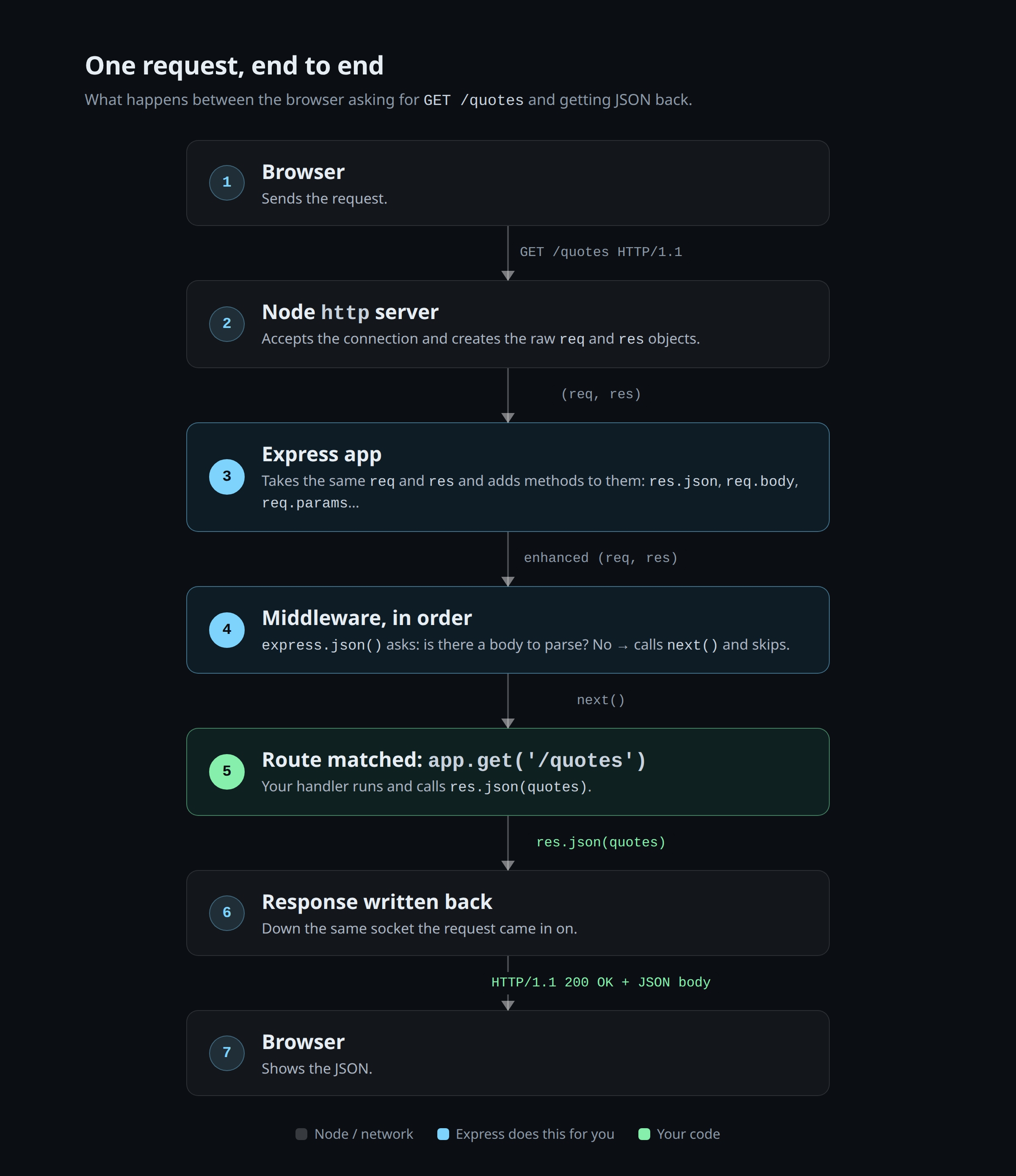
Two ideas to carry forward, because the next two posts are built on them:
- Routing is just "given this method and path, which handler runs?" That's all of Post 3.
- Middleware is "functions that run in order, before or around your
handler, each one able to touch
req/resor pass control along." Thatexpress.json()line? That was your first piece of middleware, and Post 4 is entirely about this idea.
Try it: In
express-server.jsin the sandbox ↗, addapp.use((req, res, next) => { console.log(req.method, req.url); next(); });as the very first line afterconst app = express();. Refresh the preview a few times and watch the terminal: every request prints a log line before anything else happens. You just wrote middleware, and you saw the "runs in order, then callsnext()" pattern with your own eyes. We'll obsess over thatnext()very soon.
The whole thing, live
Both servers are in one project, so you can flip between them and feel the
difference: npm start for Express, npm run raw for raw Node, npm run bad
to throw garbage at whichever is running.
👉 Open the live demo in StackBlitz ↗
Dig deeper
- Open Node's
httpdocs and read thehttp.createServerandIncomingMessagepages. Everything Express does starts with those two objects. - Look at Express's
lib/response.json GitHub and findres.json. It's about ten lines. Seeing how small the "magic" is changes how you debug it later. - Search for "body-parser express.json".
express.json()used to be a separate package, and knowing that explains a lot of older tutorials you'll run into.
Try this too
In the sandbox ↗, add one more route to
raw-server.js by hand: GET /quotes/:id, returning the matching quote or a
404. You'll have to split the path, pull out the id, and convert it to a number
yourself. Then do the same thing in express-server.js with
app.get('/quotes/:id', ...) and req.params.id, and hit /quotes/1 in the
preview. Feeling that difference in your fingers, not just reading about it, is
the whole point of this post.
Next up — Part 3: Routing fundamentals. How Express matches paths, why route
order quietly decides who wins, and how :params, wildcards, and query strings
actually work once you stop guessing.